English | Česky → | ← Back to articles
Custom agent inventory with Microsoft Agent 365
TL;DR — Microsoft shipped a Graph endpoint (
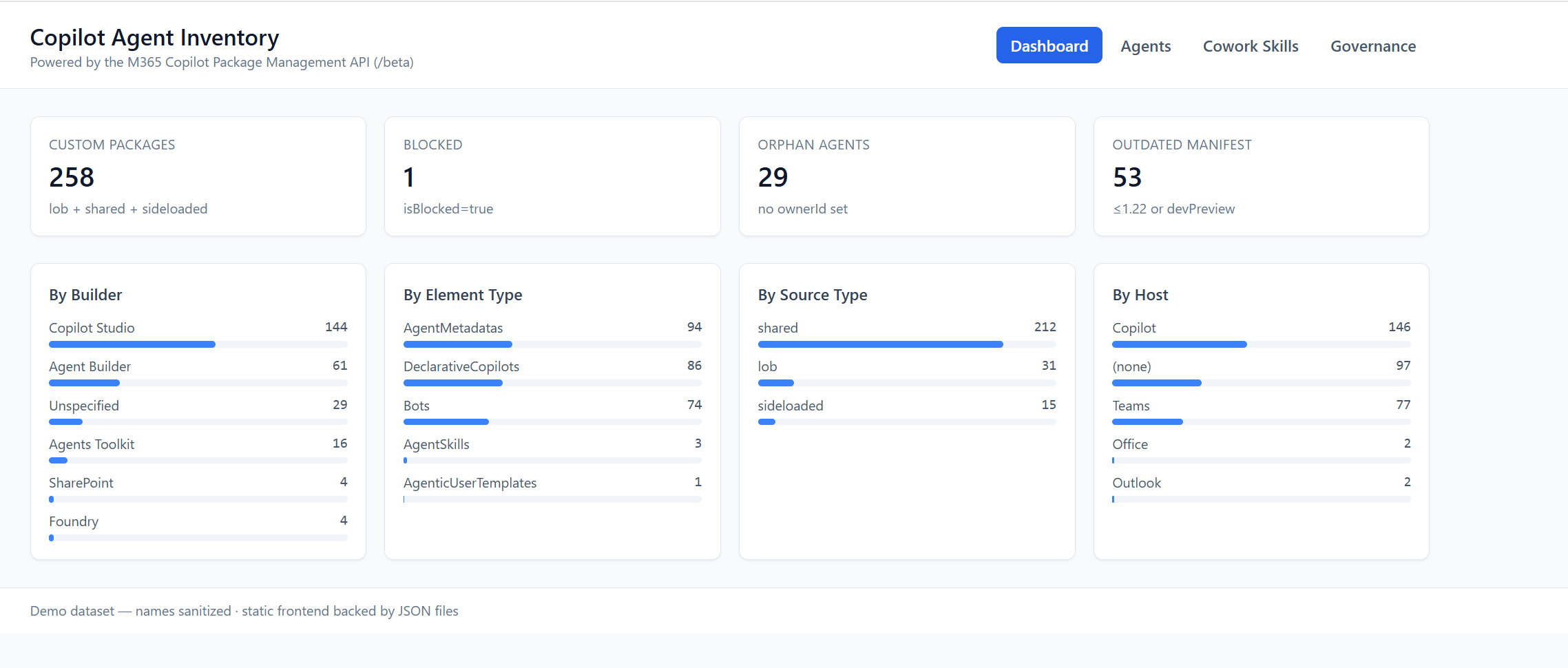
/beta/copilot/admin/catalog/packages) that finally lets a Copilot admin see every custom agent, declarative copilot, bot, and Office add-in in their tenant — across Copilot Studio, Agent Builder, Teams Toolkit, SharePoint, AI Foundry, and sideloaded packages — in one paged JSON feed. We ran it against a real tenant and the picture it paints of “agent sprawl” is more interesting than any slide deck.As a courtesy — so you can see what the API actually returns without writing a single line of code — we put together a small read-only dashboard at a365graph.ai-news.cz. This article is about the Graph API. The dashboard is just an enrichment that shows the kind of value sitting in those JSON rows.
Prerequisites. This is a Microsoft 365 Copilot admin surface, but it sits behind a separate licensing gate. To use it you need:
- The tenant must be licensed for Microsoft Agent 365 — per Microsoft’s own Package Management API overview, access to the Package Management API requires a Microsoft Agent 365 license. An M365 Copilot license alone is not enough.
- The calling user must have the Copilot Admin role (or Global Admin / Cloud App Admin).
- The token must be delegated; app-only is not currently supported (more on that in the gotcha below).
Official docs: Package Management API overview (preview).
Why this matters
Every Microsoft 365 tenant that turned on Copilot in the last 18 months ended up with the same shape of problem:
- Marketing built a “Brand Voice Coach” in Copilot Studio.
- A developer published a “Knowledge Q&A” via Agent Builder from chat.
- IT Ops sideloaded a Teams Toolkit custom-engine agent for ServiceNow.
- A SharePoint admin created an AgentSkill for “summarise this document”.
- An MVP enabled three Microsoft-made declarative agents from the store.
- A vendor delivered a packaged bot with a 2024-vintage
manifestVersion.
Each lives in a different builder, ships in a different SKU, and — until recently — was governed by a different blade in a different admin portal. Trying to answer the question “how many AI agents do we actually have, and who owns them?” meant clicking through Teams Admin Center, the Power Platform admin centre, the SharePoint admin centre, and a CSV your tenant admin exported manually.
The Copilot Agent & app Package Management API (preview) fixes that from the data side. It doesn’t unify the experiences — it unifies the inventory. Every package that can be installed, enabled, or assigned in Microsoft 365 Copilot shows up in one paged collection, with the same shape, the same governance fields, and the same filter grammar.
That’s the only ingredient missing from doing serious agent governance.
The API in one screen
Base URL: https://graph.microsoft.com/beta/copilot/admin/catalog/packages
Scope: CopilotPackages.Read.All (delegated — see the gotcha below)
Method: GET (list and detail), PATCH (block / unblock), DELETE (remove)
List endpoint
GET /beta/copilot/admin/catalog/packages
    ?$filter=supportedHosts/any(h:h eq 'Copilot')
    &$top=100
Returns a standard OData v4 paged collection: value[] + @odata.nextLink
until you’ve drained the set. No $count, no $expand, but $filter is
remarkably flexible.
Detail endpoint
GET /beta/copilot/admin/catalog/packages/{id}
Returns everything in the list payload, plus:
availableTo/deployedToenums (more on these below — they’re the governance gold)allowedUsersAndGroups— the granular allow-list: which specific users and groups the admin has permitted to access this packageacquireUsersAndGroups— the actual installed footprint: users and groups that have acquired / installed the package. This is your real adoption signal, notdeployedTo.elementDetails[]— manifests for every constituent (declarative agent, bot, action, etc.) including the AAD App ID, manifest ID, and (for declarative agents) the inlineinstructionsandcapabilitiesblock
The list endpoint is enough for a dashboard. The detail endpoint is what you need for actual lifecycle work (find the owner of orphan agents, block a package by ID, validate the manifest version inside).
Mutating endpoints
PATCH  /beta/copilot/admin/catalog/packages/{id}    { "isBlocked": true }
DELETE /beta/copilot/admin/catalog/packages/{id}
These are the levers admins actually want: stop a misbehaving agent from being installed by anyone, or remove the package from the tenant. (Removing the package doesn’t undeploy the underlying Bot resource or AAD App Registration — it just takes it out of the Copilot catalog.)
The gotcha nobody warns you about: this is delegated only
You will read the API reference, copy your client-credentials boilerplate from
the last Graph automation you wrote, paste in your CopilotPackages.Read.All
application permission … and get a flat HTTP 403 with a body that says
nothing useful.
The Copilot package endpoints don’t accept app-only tokens. They require a user token, and that user has to be a Copilot Admin (or Global / Cloud App Admin). The team confirmed this is intentional during preview — the API surface is shaped for human admins running governance workflows, not for unattended service principals.
Practical consequence: anything you build on this needs a sign-in. For our
inventory tool we use MSAL device-code flow with a serialised on-disk
token cache, so it’s a one-time login per machine and silent on every later
run. The relevant code lives in agentsreports/auth.py — about 120 lines,
mostly because we wanted nice progress logs through the polling loop.
If you can’t do device-code (CI pipeline, headless box), the fallback is:
az login --scope https://graph.microsoft.com/CopilotPackages.Read.All \
         --allow-no-subscriptions
az account get-access-token \
    --scope https://graph.microsoft.com/CopilotPackages.Read.All \
    --query accessToken -o tsv > .token
…and read the token from $COPILOT_TOKEN or .token. Tokens last an hour, so
this is fine for ad-hoc analysis but not for a long-running service.
The schema, decoded
Every package object has roughly this shape:
{
  "id": "guid",                 // package ID (the one for /packages/{id})
  "displayName": "Brand Voice Coach",
  "shortDescription": "…",
  "publisher": "Contoso Marketing",
  "publisherDomain": "contoso.com",
  "version": "1.4.2",
  "manifestId": "guid",         // Teams manifest ID
  "appId": "guid",              // AAD App Registration ID
  "isBlocked": false,
  "lastModifiedDateTime": "2026-04-30T12:13:14Z",
  "createdDateTime": "2025-09-01T08:00:00Z",
  "type": "shared|lob|sideloaded",   // origin / lifecycle bucket
  "supportedHosts":  ["Copilot", "Teams", "Outlook"],
  "elementTypes":   ["DeclarativeCopilots", "Bots", "AgentSkills"],
  "supportedBuilders": ["Copilot Studio", "Agent Builder", "Agents Toolkit",
                        "SharePoint", "Foundry", "Unspecified"],
  "availableTo": "none|some|all",   // packageStatus enum
  "deployedTo":  "none|some|all",   // packageStatus enum
  "ownerId":     "guid|null"
}
A handful of these deserve a closer look.
type — the lifecycle origin
shared— published through the official builder pipelines (Copilot Studio publish, Agent Builder publish, Foundry agent registration). Counts as first-class tenant content.lob— line-of-business: privately uploaded for the tenant, typically a Teams Toolkit-built package that was uploaded through the Teams Admin Center.sideloaded— installed directly by an end user via “Upload custom app”, not promoted to tenant inventory. Sideloaded packages are how shadow agents get into the tenant — they bypass admin review.
In our real tenant we found shared:212, lob:31, sideloaded:15. Fifteen
sideloads — every one of them needs to be examined and either promoted, blocked
or removed.
elementTypes — what’s actually inside
A package can carry multiple element definitions at once. The interesting ones are:
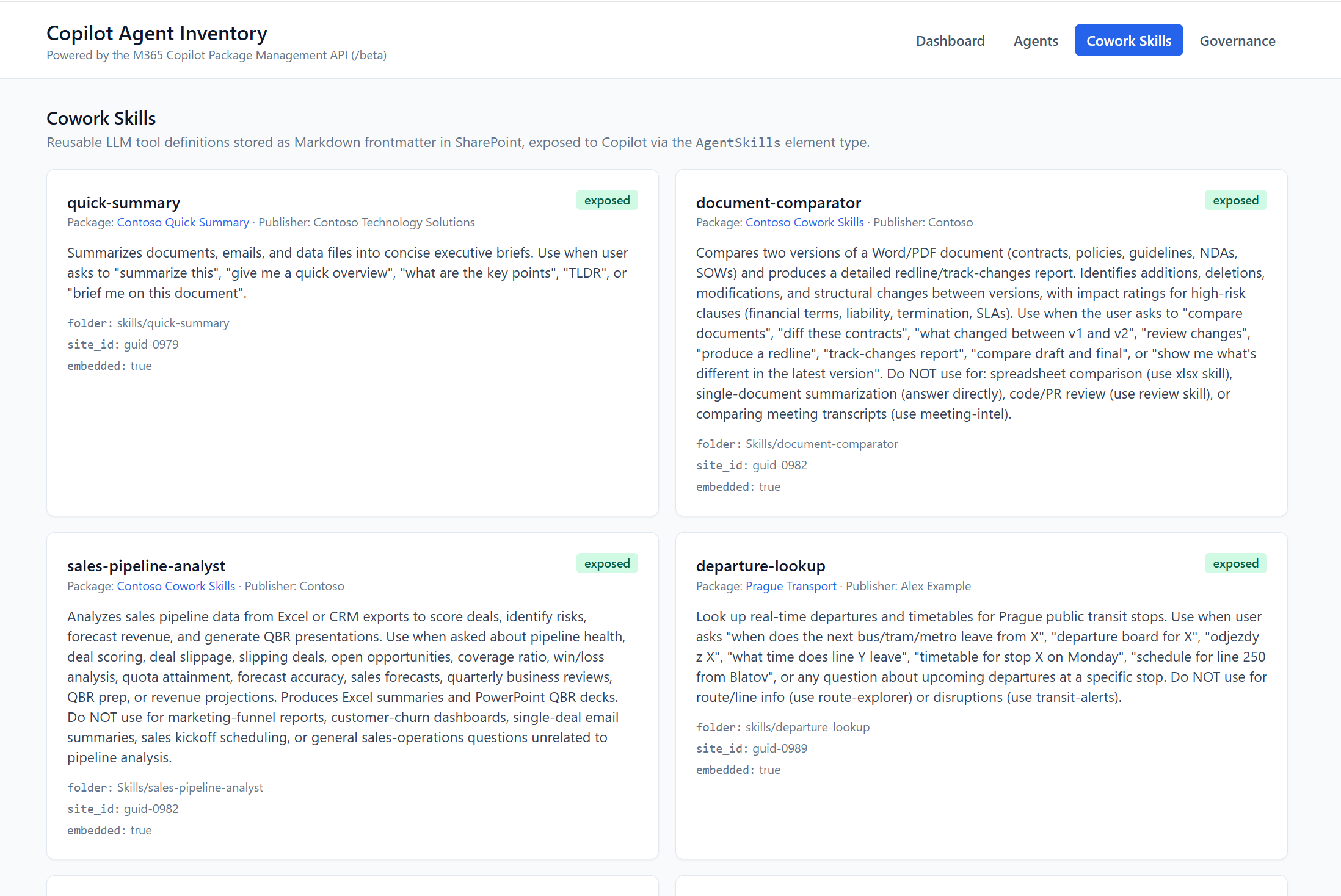
DeclarativeCopilots— a YAML-ish agent manifest with instructions, conversation starters, capabilities (Graph Connectors, code interpreter, image generator), andactions[](OpenAPI / Power Platform action plugins). These are the Microsoft 365 Copilot agents in the everyday sense.AgentMetadatas— Copilot Studio-built bots, both declarative and custom-engine. The metadata wraps the bot’s Power Platform environment ID and the published bot ID.Bots— classic Azure Bot Service bots, including custom-engine agents (CEAs) talking to a Container App or Functions backend. Most legacy “Teams bots” land here.AgentSkills— reusable LLM tool definitions stored as Markdown front-matter in SharePoint, exposed to agents on-demand. New, lightly documented, and very interesting (see screenshot).AgenticUserTemplates— pre-canned conversation templates for the agentic Copilot UI (one in our tenant — clearly someone experimenting).
The breakdown in our real tenant: 94 AgentMetadatas, 86 DeclarativeCopilots, 74 Bots, 3 AgentSkills, 1 AgenticUserTemplate.
availableTo vs deployedTo — the field combo that runs your audit
This pair of fields is the single most under-documented part of the API, and the one that matters most for governance. Both describe admin choices, not user behaviour — something we got wrong the first time we looked at it.
| Field | Per the docs |
|---|---|
availableTo |
“Enum value specifying which users or groups within the tenant can access this package” — the admin’s access policy. |
deployedTo |
“Enum value indicating the current deployment scope of the package within the tenant” — the admin’s deployment scope. |
Both take the same packageStatus enum: none, some, all
(plus the evolvable sentinel unknownFutureValue).
What each combination means in practice:
availableTo=all, deployedTo=all— broadly published. Admin permits everyone to access AND actively deployed to everyone. Tenant-wide rollout.availableTo=all, deployedTo=some— broadly permitted, narrowly pushed. Anyone can install it, but the admin only proactively deployed (e.g. pre-pinned) for a subset.availableTo=all, deployedTo=none— opt-in availability. Admin permits everyone to access, hasn’t actively deployed it to anyone. Pure self-install model.availableTo=some, deployedTo=some— scoped pilot. Restricted access AND restricted deployment. Healthy state for a not-yet-GA agent. Verify the assignment groups still exist.availableTo=some, deployedTo=none— restricted, opt-in inside the group. Admin allow-listed certain users, but didn’t proactively push.availableTo=none, deployedTo=none— nobody can access, nothing deployed. Effectively retired or never-released. Candidate for removal.availableTo=none, deployedTo=some— danger. The admin revoked access, but a prior deployment is still in place. This is what you see briefly after an admin block before the cleanup completes. If you see it and you didn’t block intentionally, something went wrong.
Neither field tells you adoption. “Are users actually using this?” is
answered by acquireUsersAndGroups on the detail endpoint — the list of
users/groups that have actually acquired the package. A package can be
availableTo=all and still have an empty acquireUsersAndGroups; that’s
your real adoption signal.
For the dashboard at a365graph.ai-news.cz we visualise this combo on the Governance tab — it’s by far the most useful single thing to look at.
ownerId — and what null means
ownerId is the AAD ObjectId of the user listed as the package owner. In a
well-run tenant every custom package has one. In a real tenant, many don’t —
and that’s the bug, not the feature:
- For declarative agents created from chat (“New Copilot agent”), the
builder writes the agent into your personal sandbox and
ownerIdis you. - For shared / published declarative agents from Copilot Studio,
ownerIdcomes from the Power Platform environment owner (often a service account). - For Microsoft-made content and SharePoint AgentSkills,
ownerIdis routinely null. Nothing to do about that. - For third-party bots sideloaded via Teams Toolkit,
ownerIdis whatever the developer set during package publish. Often null. These are the agents you cannot ring up when something breaks.
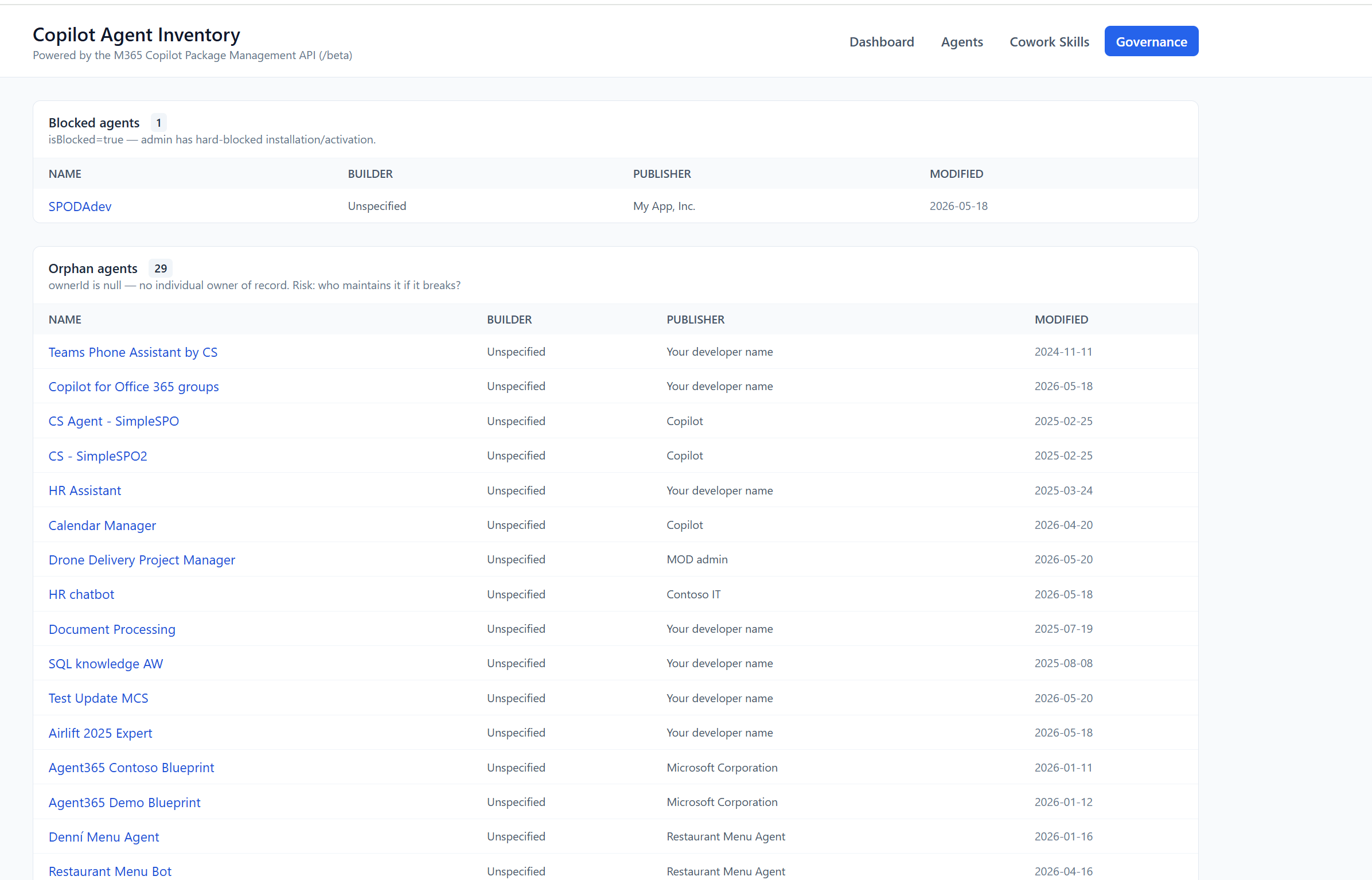
In our tenant: 29 orphan agents with ownerId=null. Most are Microsoft
samples and “Your developer name” defaults that someone forgot to change.
But two were business-critical bots whose original developer left the company.
The Governance tab below surfaces this exact list:
manifestId & appId — the cross-references
Every package keeps two extra IDs that let you cross-reference with the real backing resources:
manifestId→ the Teams app manifest GUID (matchesidinmanifest.json). Use this to look up a package in the Teams Admin Center.appId→ the AAD App Registration Application ID. Use this to find the bot’s Azure Bot resource, audit App-permission grants, find Conditional Access assignments, etc.
If you’re auditing security posture, the appId is what you need. The
Graph package row tells you a Copilot custom agent exists; the corresponding
App Registration tells you what permissions it was granted, whether the secret
has been rotated, and whether anyone signed in with it lately.
What we found in a real tenant: 258 packages
We ran the inventory script against a real tenant. The headline numbers:
| Metric | Count | Notes |
|---|---|---|
| Custom packages | 258 | lob + shared + sideloaded |
| Blocked | 1 | isBlocked=true — admin hard-blocked it |
| Orphan agents | 29 | no ownerId — no individual maintainer |
| Outdated manifest | 53 | manifestVersion ≤ 1.22 or devPreview |
| Copilot-hosted agents | 146 | live in the Microsoft 365 Copilot host |
| Built with Copilot Studio | 144 | |
| Built with Agent Builder | 61 | |
| Built with Teams Toolkit | 16 | |
| Sideloaded (shadow IT?) | 15 | |
| Bots (Azure Bot Service) | 74 | classic CEAs + legacy Teams bots |
| Declarative copilots | 86 | the modern Copilot agent surface |
A few takeaways that surprised even the team running the tenant:
-
The platform mix is genuinely fragmented. Copilot Studio dominates by count (144), but it’s not a majority — 114 packages were built somewhere else, with five other builders all in active use. Any governance story you tell about “our Copilot Studio agents” is missing 44% of the surface.
-
53 packages on outdated manifests is a TLS-cert-style time bomb. The Teams app manifest schema is now at v1.22 and the declarative agents that don’t include
webApplicationInfosimply render with blank input fields — adaptive cards haveInput.Text/Input.ChoiceSetstripped client-side. (We hit this exact issue building one of the in-house agents.) -
Sideloads aren’t necessarily bad — but they’re invisible to most admin tooling. Fifteen
sideloadedpackages were users uploading their own.zipfromatk install. Two were prototypes that had quietly become important. None were in the Teams Admin Center catalog. Without this API, we wouldn’t have known they existed. -
The “Cowork Skills” surface is real and growing.
AgentSkillselement type is brand new — three in our tenant, all exposed via the inline-skills system that reads Markdown front-matter from a known SharePoint folder. This is the agent-tool-mesh building blocks that Microsoft is rolling out under the Copilot Studio “skills” banner.
What the API gives you, visualised
To make this concrete — and to spare you having to run the inventory script yourself just to see the shape of the data — we put the output of one real tenant behind a small read-only dashboard at a365graph.ai-news.cz.
The dashboard is not the point of this post; the API is. Each view below is just a different slice of the same JSON the endpoint returns — there to show you the kind of governance picture that’s now within reach with one HTTP call.
Dashboard — single-screen overview
Four KPIs (Custom packages · Blocked · Orphan agents · Outdated manifest) and four breakdowns (Builder · Element Type · Source Type · Host) — all derived directly from list-endpoint fields. This is the kind of summary a Copilot admin can now produce at any time, against any tenant.
Agents — searchable inventory
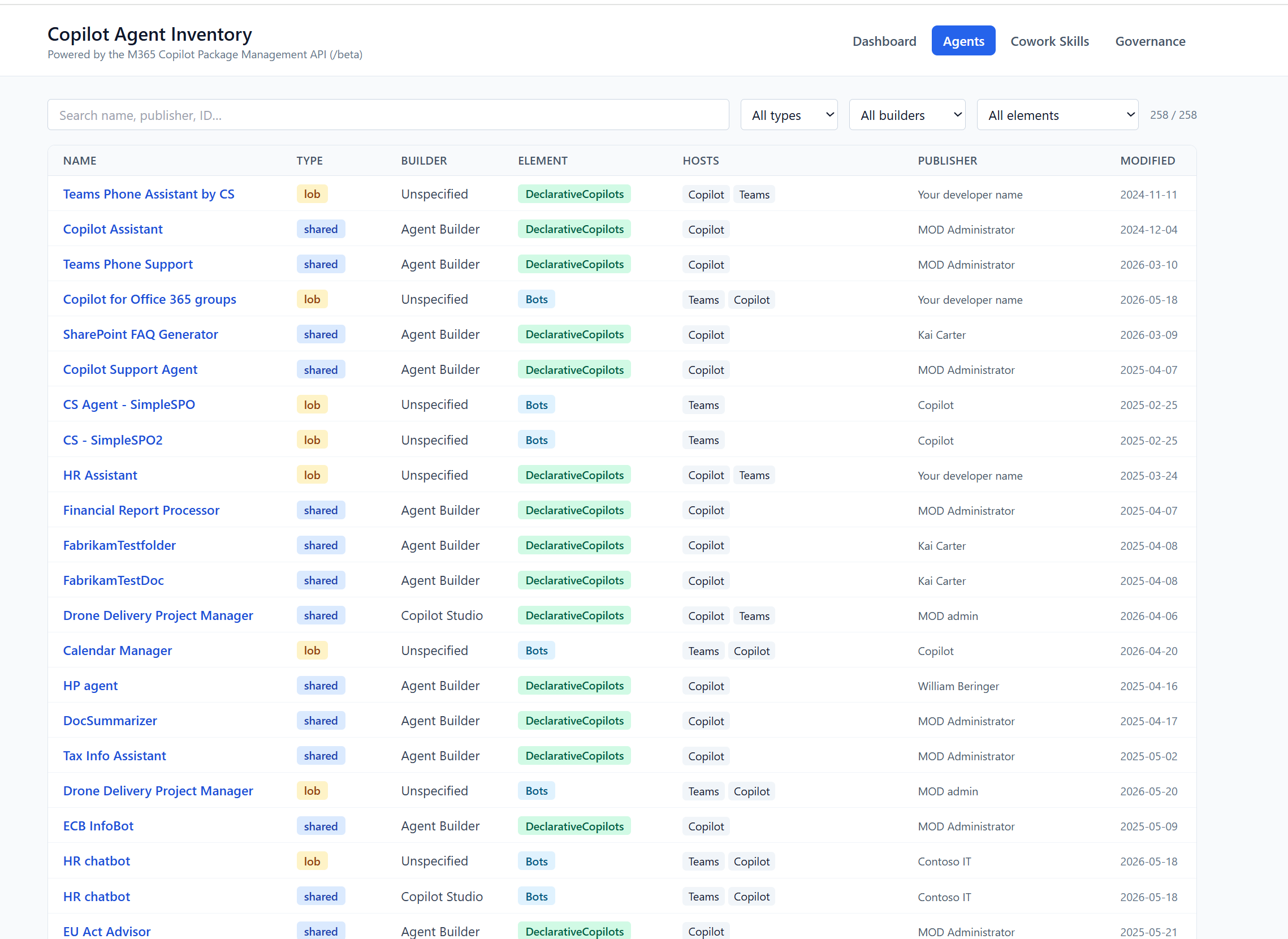
Every package in the tenant as one row, searchable by name / publisher / ID
and filterable by type, builder, and element. Behind each row sits the full
/packages/{id} payload — element definitions, assigned users, assigned
groups, manifest version. All of it from the API.
Cowork Skills — the AgentSkills surface
A dedicated view for the AgentSkills element type — the new SharePoint-hosted
LLM tool definitions Copilot agents compose at runtime. Until this API, there
was no admin surface that even listed them.
Governance — the action queue
The two lists that turn a JSON dump into a workflow: blocked packages
(driven by the isBlocked field) and orphan agents (driven by
ownerId=null). Both fall out of the API for free.
Things we tried that you can copy
Five small patterns we landed on that turned out to be high-value:
1. Use $filter server-side, not client-side
OData filters compose well on this endpoint and the server already paginates. Don’t pull all 258 packages and filter in Python — push the filter.
# "agents on Microsoft 365 Copilot, modified in the last 30 days"
$filter = (
    "supportedHosts/any(h:h eq 'Copilot') and "
    "elementTypes/any(e:e eq 'DeclarativeCopilots') and "
    "lastModifiedDateTime gt 2026-04-24T00:00:00Z"
)
2. Cache the device-code refresh token to disk
MSAL ships a SerializableTokenCache. Persist it to a file under
.token_cache.bin (gitignored) so subsequent runs are silent. We added a
tiny check for a .token file as a fallback for headless boxes.
3. Retry on 424 and 429
The Graph package endpoint sometimes throttles with HTTP 424 instead of
the standard 429. This is a beta-API quirk. Our GraphClient treats both as
retryable with exponential backoff:
retryable = {424, 429}
if resp.status_code in retryable or resp.status_code >= 500:
    wait = retry_after or min(2 ** attempt, 30)
    time.sleep(wait); continue
4. Always pull --details for governance
The list endpoint is fast but doesn’t carry allowedUsersAndGroups,
acquireUsersAndGroups, or elementDetails. For real governance you want
the per-package detail — in particular acquireUsersAndGroups, which is the
only field that tells you whether anyone has actually installed the package.
Budget ~2 ms per call on a warm cache, ~50 ms cold — for 258 packages that’s
about 15 s end-to-end.
What’s still missing from the API
The endpoint is excellent. Not perfect.
- No
$counton the collection. You don’t know how many pages you have until you’ve drained them. Not a showstopper, but it makes progress UIs harder. - No
$expandforelementDetails. You always do an N+1 to get them. For 258 packages that’s 258 extra HTTP calls. Cacheable, but tedious. - No webhooks / change feed. There is no
delta()on the collection — you can’t subscribe to “tell me when a new agent is published”. You have to poll and diff. We do this nightly to a little JSON snapshot in blob storage; that diff is what drives the Slack alert. devPreviewmanifest agents leak through. Old declarative agents that were built against the dev-preview manifest schema show up alongside current packages with no visual marker. They’re discoverable via themanifestVersioninsideelementDetails[].manifest, but parsing semver is on you.- App-only is still blocked. Already covered. The day this lands, nightly inventory becomes trivial in a service principal.
None of this is blocking — it’s the kind of polish that a preview API collects on the way to GA.
What we’d like next from Microsoft
Three asks, in priority order:
- App-only support with a tightly scoped permission
(
CopilotPackages.Read.Allalready works delegated; ship the app-only variant). Today every nightly-inventory automation needs a human-bound account. - A
delta()collection on the packages endpoint, the same shape asusers/deltaandgroups/delta. That single addition would replace 80% of the polling-and-diffing infrastructure people are about to build. - An
assignedUsers/$countsub-resource on each package. We want to answer “which agent is actually used by 10k+ users?” without enumerating every assignment.
Try it yourself
If you have a tenant licensed for Microsoft Agent 365 and a Copilot Admin account, the smallest end-to-end call against this API is essentially:
az login --scope https://graph.microsoft.com/CopilotPackages.Read.All \
         --allow-no-subscriptions
TOKEN=$(az account get-access-token \
  --scope https://graph.microsoft.com/CopilotPackages.Read.All \
  --query accessToken -o tsv)

curl -s -H "Authorization: Bearer $TOKEN" \
  "https://graph.microsoft.com/beta/copilot/admin/catalog/packages?\$top=100" \
  | jq '.value | length, .[0]'
If the result is a count and one package object — congratulations, you have the full Copilot agent inventory of your tenant in one paged feed.
For a slightly nicer wrapper (MSAL device-code, OData paging, retry on
424/429, a Markdown report generator) the Python client we used is published
as agentsreports/ in the source repo. It exists so you don’t have to
rewrite the same 200 lines.
And if you want to see what the API gives you before writing any code, the live extract lives permanently at a365graph.ai-news.cz.