Personal blog. This site reflects my own testing and my own opinions. It is not an official Microsoft statement and it is not official Microsoft documentation in any way. For authoritative guidance always refer to Microsoft Learn.
TL;DR — Writing a business app is no longer the hard part. Any capable AI will produce one in minutes. The hard part in a large organisation is the boring question that follows: where does it run, whose identity does it use, what data can it touch, and who can see that it exists?
Copilot Managed Runtime (public preview) is Microsoft’s answer: a Microsoft-hosted runtime inside the Microsoft 365 tenant boundary where every app — whether a business user built it in the Microsoft 365 Copilot app (Code or Cowork), a maker in Copilot Studio, or a developer with any coding agent — gets Entra sign-in, governed data access, one inventory and one set of admin controls.
It is largely off by default: an admin sets up app governance and opens the creation paths in the Microsoft 365 admin center, and apps run on Power Apps Premium or Copilot Credits.
I built apps on it both ways: in Copilot Cowork, the natural route for business users, and with Claude Code — not a Microsoft AI — for the bigger ones. That says something about how open it is.
What this article is. An introduction and an opinion, grounded in a few days of hands-on use in a lab tenant. It is not a step-by-step guide and not an official Microsoft statement. The product is in preview and changes weekly; observations were last checked on 6 October 2026.
The problem nobody asked for, and everybody now has
A year ago, “can we build an app for that?” meant a backlog, a budget and a quarter. Today it means a prompt. Copilot, Claude, Codex, Lovable, Bolt, v0 — pick one, describe a deal tracker or a fee calculator, and you get a working web app before your coffee is cold.
That is wonderful, and in a large organisation it is also a problem:
- The app needs somewhere to run. A developer’s laptop, a personal cloud account, a SaaS builder’s hosting — none of those is where a bank, an insurer or an asset manager wants its client data to go.
- The app needs an identity. The fastest route is always a service account or an API key pasted into the code — exactly what security teams spend years removing.
- The app needs data, and data is the whole point. The moment it reads a CRM table or a SharePoint list, someone has to answer “who can see what through this?”
- Somebody has to know it exists. Shadow IT used to be spreadsheets and Access databases. With AI it is going to be thousands of small, genuinely useful web apps.
Blocking AI app builders doesn’t work for long — people find a way, and the useful ideas go underground. The interesting question is not whether people will build apps with AI, but whether there is a safe, boring, enterprise-grade place for those apps to land.
What Copilot Managed Runtime is
In one sentence: a Microsoft-operated runtime in your Microsoft 365 tenant where internal web apps run with your identity, your data policies and your oversight, regardless of what built them.
 Microsoft 365 Copilot app ─┐
   Code · Cowork            │
 Copilot Studio            ─┤                      ┌─► Dataverse, SharePoint, Outlook, Teams,
 ms CLI + SDK with         ─┼─►  Managed Runtime  ─┼─► Work IQ (Microsoft 365 Copilot),
   GitHub Copilot,          │    Entra sign-in     └─► Copilot Studio agents, 1,500+ connectors
   Claude Code, Codex       │    governed data           — always as the signed-in user
 Lovable                   ─┘    one inventory
A few things make it feel different from “yet another hosting option”:
- Many front doors, one runtime. The most visible one is the Microsoft 365 Copilot app itself: its
Code mode turns a plain-language description into a reusable app grounded in the user’s work context
(Microsoft describes it as running in a sandbox and hosted in the tenant), and Cowork can build simpler
apps as one of its skills. A maker builds in Copilot Studio; a developer uses the
mscommand line with whatever coding agent they like. All of it ends up in the same place, governed the same way. - No secrets in the app, by design. The app is a static web app running in a sandbox. It cannot call arbitrary endpoints. Every data call goes through a governed connector, under the signed-in user’s own identity, through the organisation’s data-loss-prevention and connector policies. There is no API key to leak because there is nowhere to put one.
- Sharing an app does not share data. If a colleague opens your app but has no access to the SharePoint list behind it, they get the app and not the data.
- It is Git all the way down. Every app has a repository; the platform builds each commit; preview and live are separate; going live is an explicit step; rollback is deploying an older commit.
- One place for admins. Every app, however it was built, shows up in the Microsoft 365 admin center — owner, region, usage, health — and can be blocked with one click.
If you know Power Platform, this will feel familiar underneath: environments, connectors and data policies are the same machinery that governs Power Apps today. What is new is the code-first, AI-first front end, the Git-based build pipeline, the admin-center inventory and consumption billing.
It is (largely) off by default — and that is the right call
The runtime itself is present in every eligible tenant, but the doors into it are mostly closed until an administrator opens them. The developer command-line path is switched off by default; app building in Copilot Code and Cowork arrives through Microsoft’s early-access Frontier programme; and governance has to be set up. (Measured: in the lab tenant, nothing could be built from the command line until an administrator had done this. Per the documentation, app creation in Copilot Studio is the exception — on by default during the preview, and controlled from the same place.) In the Microsoft 365 admin center, Apps → Overview walks an admin through setting up app governance: it creates a governance group with Microsoft-managed default rules (who gets a personal development environment, which connectors and MCP servers apps may use, how widely apps may be shared, which content sources the browser may load) and lets the admin choose which creation paths are on — Cowork, Copilot Studio, the command line.
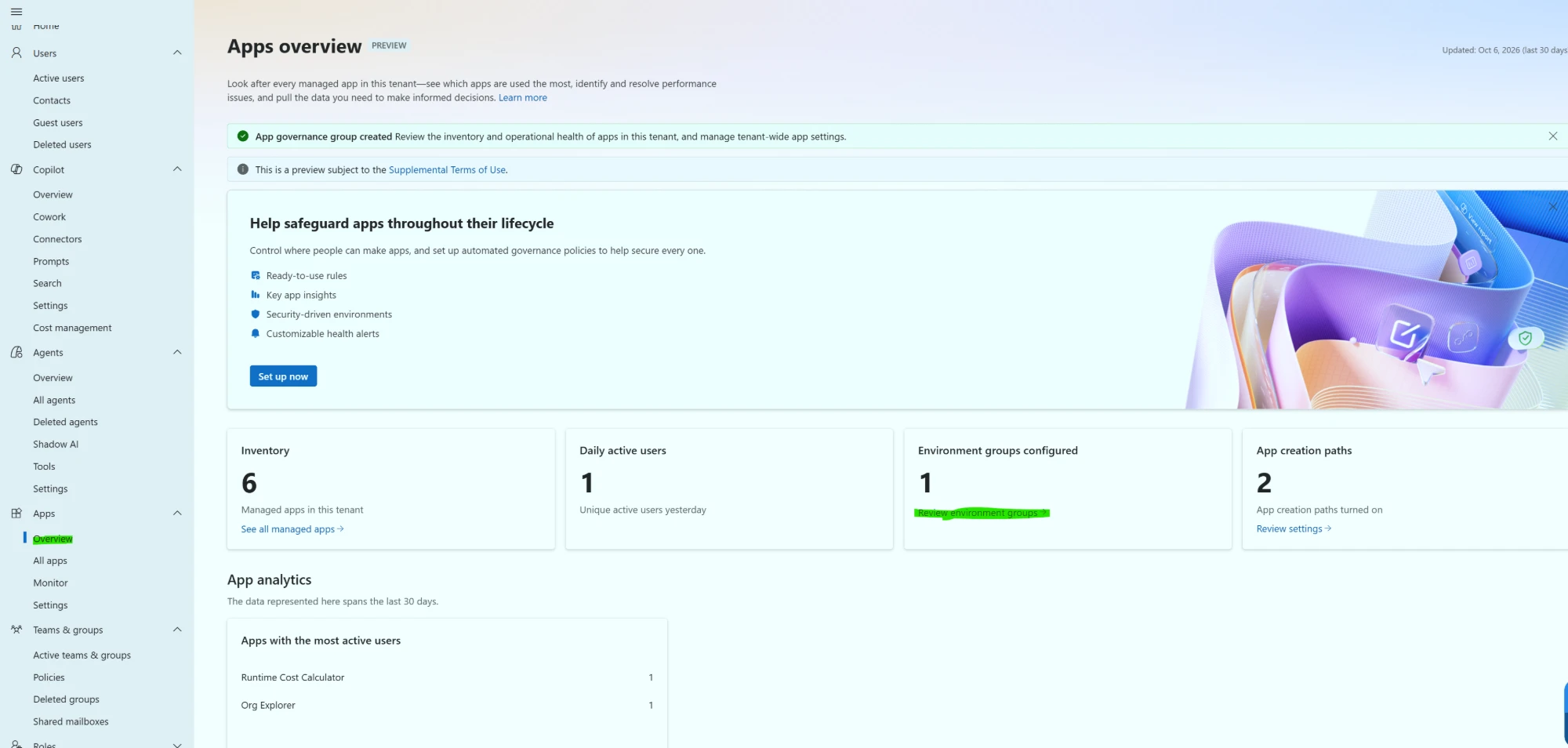
Apps overview in a lab tenant after setup: the governance group exists, six apps are in the inventory, two creation paths are on.
The defaults are conservative in a way security teams will appreciate. Out of the box, apps may use a curated list of Microsoft first-party connectors, and individual risky actions inside them — “send an arbitrary HTTP request”, “run a script” — are blocked. Opening up more is a deliberate admin decision.
One practical note for Power Platform administrators: the runtime places makers into personal development environments through environment routing, and once governance is initialised the catch-all routing rule becomes permanent. Design routing first.
Who pays, and how
To run an app, a user needs either a Power Apps Premium licence or access to Copilot Credits. Credits are metered per app launch and per data call — a tenth of a credit per call at the time of writing — and are granted through the same spending policies that already cover Copilot Cowork and Work IQ.
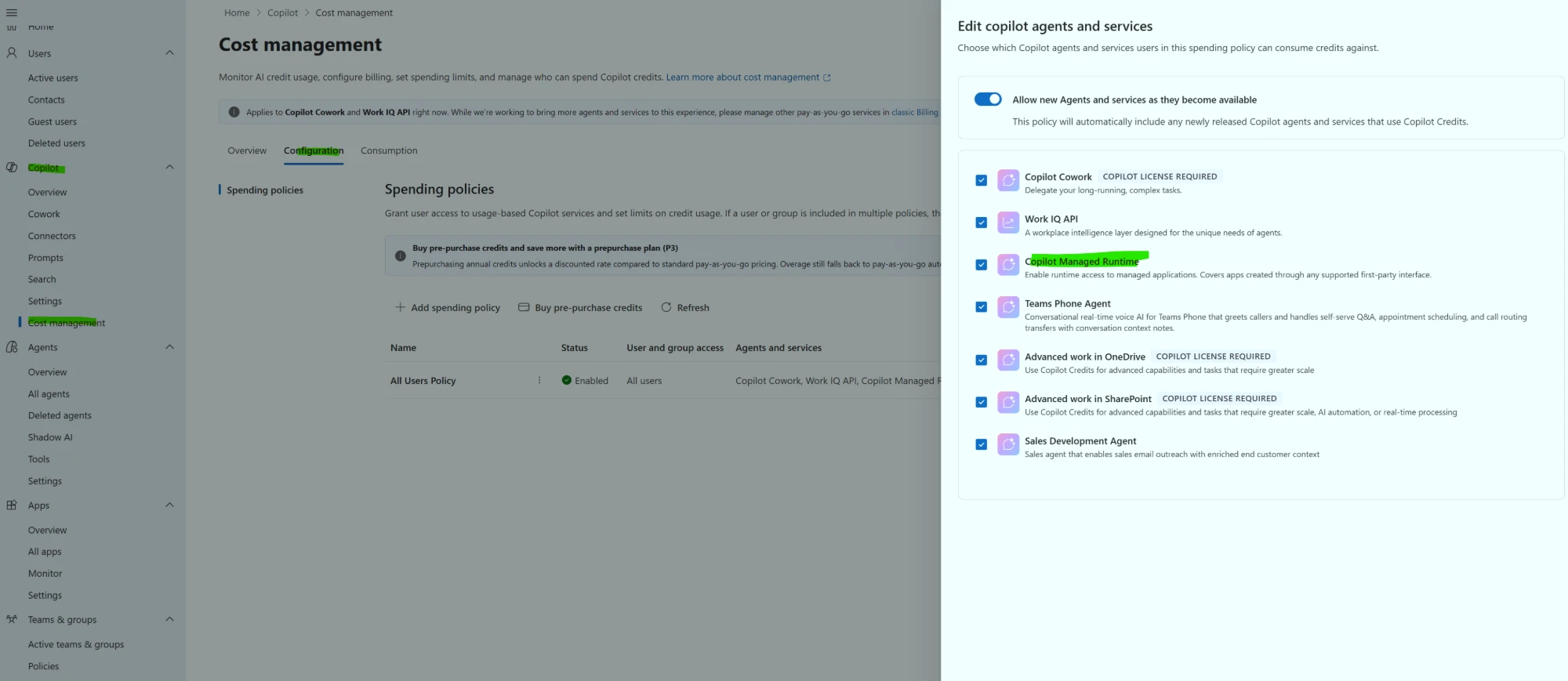
Copilot → Cost management: “Copilot Managed Runtime” is one of the services a spending policy can cover.
The interesting consequence is economic. An app that thirty people open a few times a month costs a few euros on credits, where licensing every user would cost hundreds. Heavy, all-day apps flip the other way. (Reasoning, not measurement: the break-even I calculated from the published rates is roughly twenty thousand data calls per user per month. The runtime is a paid preview; check current pricing before you plan around it.)
What I built, and with what
To see whether the developer route holds up beyond a hello-world, I built four apps with Claude Code for an investment-management storyline, all with fictional data:
- a cost calculator (no data at all),
- an org explorer on the Office 365 Users connector (management chain, profiles, photos),
- a meeting-prep app on Outlook and Work IQ,
- and Portfolio Desk: a deal pipeline in Dataverse, investment-committee requests in a SharePoint list that the committee also uses in Teams, and two AI features.
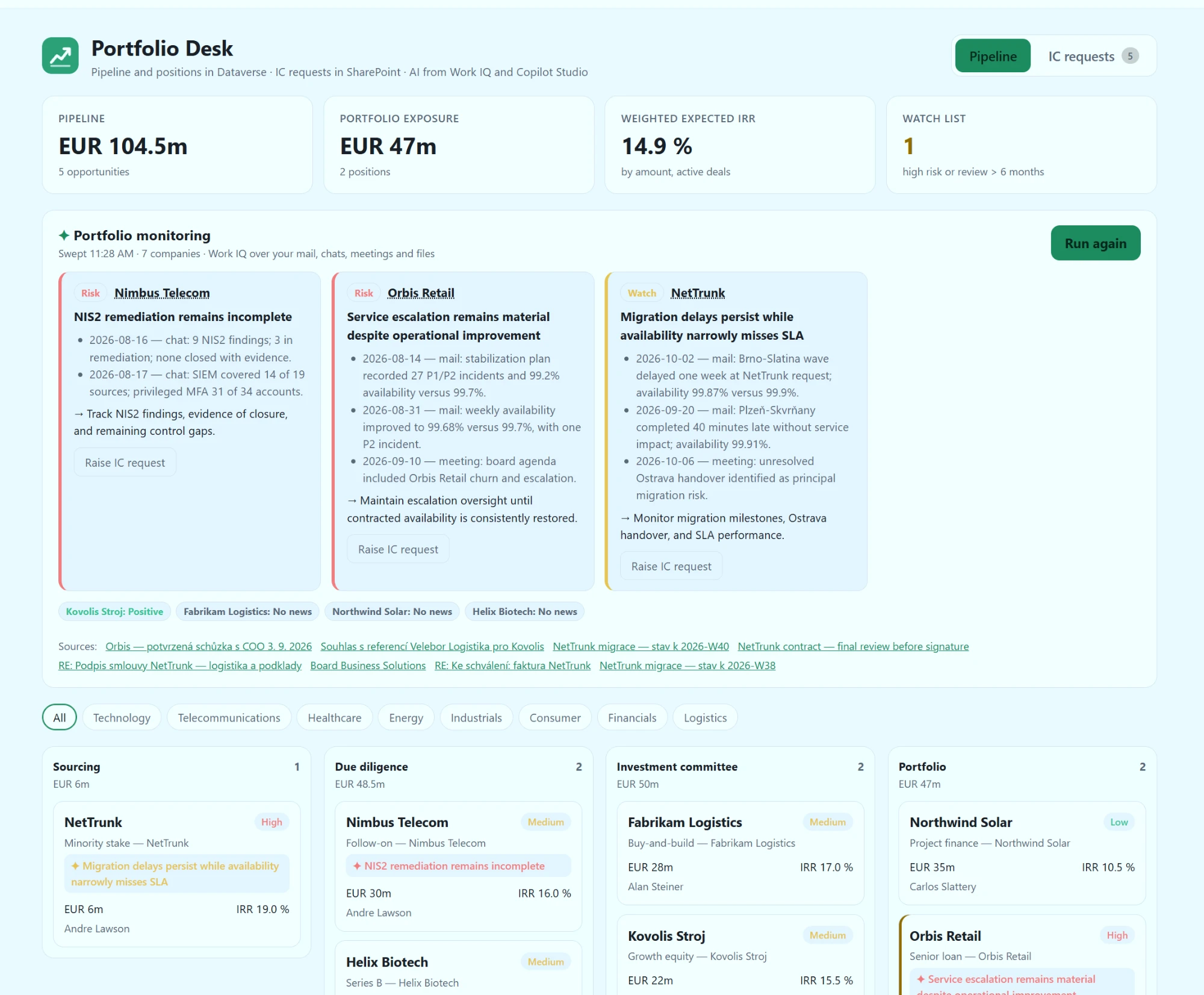
The AI part is where the “app versus chat” question gets an answer. A monitoring sweep asks Work IQ — Microsoft 365 Copilot’s work-data layer — to read the user’s mail, chats, meetings and files about every portfolio company and return structured signals: red, amber or green, with dated evidence and a suggested action. The app turns them into badges on the pipeline and, with one click, into a tracked request in the committee’s SharePoint list. A second button sends the deal to a Copilot Studio agent that drafts an investment-committee memo against the firm’s policy.
Chat would have answered the question once. The app makes the answer structured, repeatable, shared and actionable — and the data never leaves Microsoft 365, because every call runs as the signed-in user.
Two ways to build: Cowork for business users, Claude Code and its counterparts for technical ones
For business users the natural route is Copilot Cowork (and Code) in the Microsoft 365 Copilot app: describe the app in a chat, refine it in a live preview, publish and share. No tooling, no repository to think about — and the result lands in the same governed runtime as everything else. I used it for the simpler apps, and it is the part that gets a room full of non-developers leaning forward.
For more technical users there is a second route that doesn’t involve a Microsoft AI at all. The bigger
apps here were written by Claude Code, driving Microsoft’s ms command line on a Linux server. That is
not a workaround: Microsoft publishes the command line and SDK on npm, and a plugin for coding agents in its
own GitHub repository that works with GitHub Copilot and Claude Code. Its skills turned out to be the best
practical documentation available — how to wire Work IQ, how to bind Dataverse tables, which rules the
sandbox enforces.
What it took in practice, at the level of “what kind of work” rather than a recipe:
- Reading the source as well as the docs. The SDK’s type definitions answered questions the preview documentation doesn’t cover yet.
- Sign-in on a headless server. On a normal laptop the command line signs in through the browser. On a server it needs device-code sign-in — and many enterprises block device-code flow with Conditional Access. If yours does, build from a machine with a browser, and use the service-principal route that the CI/CD guidance describes for pipelines. Getting a token cache and Git credentials to behave on a server without a desktop keyring also took more time than any of the apps.
- Letting the agent follow Microsoft’s rules. The plugin is opinionated in useful ways — connectors only, least-privilege action lists for shared connections, never edit generated code, never deploy from an unpushed commit. A coding agent that reads those rules produces apps that pass governance by construction.
I tested with Claude Code. Other AI coding tools — Codex, GitHub Copilot, Gemini-based agents, IDE assistants — will very likely work in a similar way: the path is a command line, an SDK and a React app, nothing specific to one model. Lovable already publishes into the runtime directly.
That openness is, to me, the most important design decision in the product. It says: build with whatever your people like; run it where you can govern it.
What to be honest about
It is a public preview, and it behaves like one:
- Lifecycle is Git-based. Every app has a repository (platform-managed or GitHub Enterprise Cloud with your branch policies and pull requests), preview and live are separate, and you deploy and roll back by commit. If your organisation expects multi-environment promotion with different data connections per stage, check where the documentation stands before planning around it.
- Know what is audited. Creating, building, deploying and launching apps show up in the audit log; check that the documented events cover your requirements.
- Expect preview rough edges in tooling — the odd command-line or code-generation quirk, and build times that vary.
- Apps don’t talk to the internet by default. An app can’t call arbitrary endpoints — AI models included — unless an administrator allows them in the content security policy; the intended path is connectors such as Work IQ or a Copilot Studio agent. A feature for governance, a constraint for some designs.
None of that changes the shape of the idea. Team and departmental apps are a good place to start today; for business-critical processes, review the preview terms and the current state of the documentation first.
Takeaways
- Building apps is no longer the bottleneck. Governing where they run is. Plan for thousands of small AI-built apps, not a handful of projects.
- Copilot Managed Runtime moves the control point from “which tools may people use to build” to “where do the results run” — one runtime, one identity model, one inventory.
- It is largely off by default. Opening it up is an admin decision in the Microsoft 365 admin center, with credits or Premium licences behind it. Start with one creation path for one group.
- It is open. The Microsoft 365 Copilot app, Copilot Studio, Claude, Codex or Lovable can build; the runtime governs.
- Apps beat chat when the answer must become data. The best pattern pairs the two: the app owns the data and the workflow, Copilot supplies the judgement.
Written from hands-on use in a lab tenant, October 2026. Not official Microsoft guidance. The product is in preview — verify before relying on any of it. Corrections welcome — open an issue on the repository.
Written by Ondrej Stefka · LinkedIn